Bill Planner
A downloadable Bill Planner for Windows
Hello everyone!
So, I will list here most of the current features you can expect in the app. Quick note before starting: this app is currently Windows-only. I will try to get it to work on other OS at some point (Linux or Android first, and I'll see later for Apple products...) but I have some Windows-only code in there that I will have to adapt.
So, without further ado, the app contains 3 different sections: the table, "More info" and the controls (not a huge fan of that word but it'll have to do for now :D).
# The Table
The table will mainly be used to view your bills. The top bar is a search bar--any input will apply a filter for that word to only render entries that matches. It is column-agnostic so the filtering will be applied to all columns.
Multiple rows can be selected at the same time and there is more functions available when right-clicking on a row. 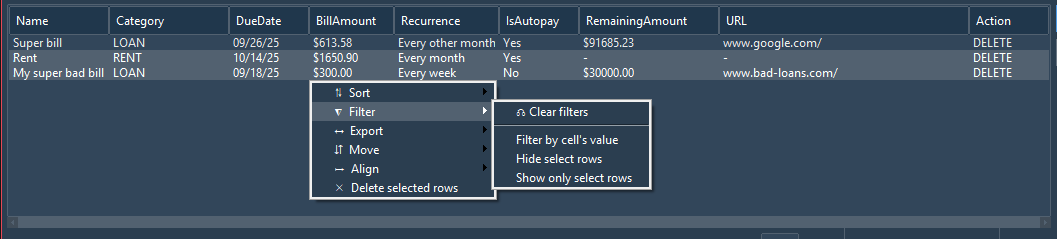 If multiple rows are selected, most options available in the right-click context menu will affect all selected rows. Quick note here: right-clicking on a bill and selecting "delete selected rows" will not delete the bill in-and-on-itself. It will still remain in the database. and be available again after refreshing the table.
If more bills than what the table can hold are available, pagination controls (found under the table itself) can be used to go through the different pages of bills. 
The button on the right can be used to reset any filters applied to the table.
# "More info"
This section is fairly straight forward: it is there to display some extra information. This information is updated every time a bill is added, edited or deleted. It focuses on providing information about the entirety of the bills, not any singular ones.
The "Average cost per month" is the calculated average of all the bills per month. This takes into account the recurrence and will average out the bill based on its monthly value (e.g., if bill amount is $300 every 2 weeks, the monthly cost (of that bill) will be $600, or if bill amount is $300 every 3 months, the monthly cost (of that bill) will be $100). This is mostly a helper know how much will be taken out of our pockets (in average) every month.
The "Next bill" provides information on the date the next bill is expected. If the date is within the next 3 days, the displayed label will change to: "Tomorrow", "In 2 days" and "In 3 days" instead of a formatted date (e.g., "Wed, October 01").
# Controls
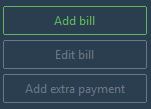
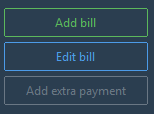
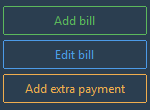
The "Add bill" button will always be enabled by default. The "Edit bill" button will be disable by default and will require a row to be selected in order to be enabled. All bills can be edited. The "Add extra payment" button will be disabled by default and will not only require a row to be selected, but the selection should also have a "remaining amount" set (see below for more information).
Once a button is pressed, all buttons will disappear to leave behind a form. Below is a description of all the buttons and their associated form:
-- Add bill - Opens a form to add a new bill.

A few properties are available to edit:
- Bill Name [Required]: custom name for the bill. This name will mainly appear in notifications and in the table.
- Category [Required]: dropdown with a selection of categories for the bill (e.g., Loan, Subscription, Utility, etc...) This isn't used too much aside from sorting and/or filtering the bills in the table by their category.
- Due Date [Required]: the next due date for the bill. Click on the small calendar icon to show a calendar popup to select a specific date. You can also input one manually. This is used throughout the app for various reasons (e.g., notifications, reminders, calculate when next bills are due, etc...). Due dates are automatically push the the next date based on the "Recurrence" value (if any).
- Bill Amount [Required]: the bill amount. No need to specify the currency at the moment. At some point, I will try and implement a way to modify the currency but that isn't in, yet. Also used throughout the app for average cost calculation, displayed on toast notifications, used to calculate the remaining amount every time the bill is due, etc...
- Is Recurrent? / Recurrence [Required if ON]: whether or not the bill is recurrent every week(s), month(s) or year. Only a few options are available for now (I only added the ones I thought would be the most used). Used every time a bill is due to push the bill automatically to the next due date.
- Is Autopay?: is the bill set to "autopay"? If set to ON, this will have the consequence of disabling the redirection to a valid URL when clicking on a toast notification (opens a tab in your favorite web browser).
- Has Remaining Amount? / Remaining Amount [Required if ON]: whether or not the bill has some remaining amount, usually used for loans or mortgages. This amount is not reflective of your real remaining amount as it is only updated by subtracting the bill amount to the remaining amount every time a bill is due (i.e., new_remaining_amount = remaining_amount - bill_amount). It doesn't account for APR or payments on principal vs. not. If you want an accurate remaining amount, please check with your bank directly. Only use this as a hint of how far you are in your payments.
- URL [Optional]: the URL that will be used when clicking on a "due" notification (doesn't apply for "reminders"). For that to happen, the following should be set: Autopay is OFF and URL is valid.
-- Edit bill - Opens a form to edit the selected bill.
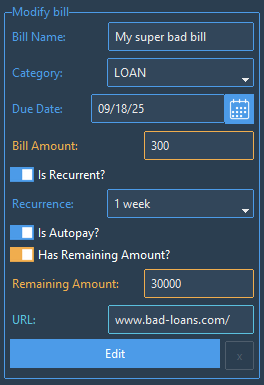
The same fields as Add Bill are available to edit. All the fields will be pre-filled with the bill data and ready to be modified. Once finished, click the Edit button and the bill will be updated in the database, and the table will refresh (as well as the other available information).
-- Add extra payment - Opens a form to add a payment to the selected bill.
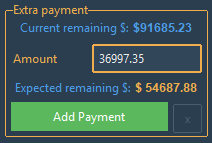
This control allows to update a bill's remaining amount with an extra payment. Here is a little disclaimer: the remaining amount isn't reflective of the actual bill. When calculating the new Expected remaining $, the calculation is simple:
Expected remaining $ = Current remaining $ - Amount
This doesn't include any APR or payment made on Principal vs. not. If you need an accurate remaining amount, please reach out to your bank for that information. This is mostly to get an estimate and know about how far you are.
# More...
-- DELETE action: Deletes the selected bill.

This removes the bill completely from the database.
-- Minimized to System Tray: Once the window app is closed, it will be minimized in the system tray.
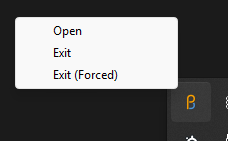
3 different options will be available by right-clicking on the icon: "Open", "Exit" and "Exit (Forced)".
- "Open": re-opens the app window.
- "Exit": shuts down the app "normally".
- "Exit (Forced)": basically shuts down the app by killing the process directly (while this can be used to exit the app normally, it is made to kill the process in the event the app window crashes).
And... that is pretty much it! Let me know in the comments if you have any issues (bugs, crashes, etc...), want to see something in particular or simply have feedback.
Thank you for checking this project out and hope it helps you as much it helps me.
Cheers!
Purchase
In order to download this Bill Planner you must purchase it at or above the minimum price of $1.99 USD. You will get access to the following files:
Development log
- Microsoft update on Malware DetectionSep 24, 2025
- Small update (v1.3) and Malware Detection updateSep 24, 2025
- Small update for Settings (targetting Toast notifications)Sep 20, 2025
- Launch day!Sep 15, 2025

Leave a comment
Log in with itch.io to leave a comment.